Back to blogs
Loading article…
Blog
Longer posts — published here first, then cross-posted to Dev.to with a canonical URL back to this site.
Back to blogs
Back to blogs
Postpocketbase, typescript, go, react
the timeline extending pocketbase useful references OAUTH Authentication with...
Date published

slides used in the presentation building the generic component In this example we'll use...

Why You Might Still Pick Next.js Over TanStack Start From a TanStack Start...

A complete theme management system for React applications with SSR support! ✨ 🌟...
useful references
requirements for this part:
pb_data/data.dbFirst we'll set up our pocketbase using the admin dashboard >this can also be done using migrations , pocketbase is introducing JavaScript migrations using GOJA , but current migrations documentation is not very good so I didn't spend too much time on them and opted for direct SQL commands instead I'll leave the repo link to the directory where I put all the experiments in .
<details>
<summary>Click to expand schema</summary>
1[2 {3 "id": "_pb_users_auth_",4 "name": "users",5 "type": "auth",6 "system": false,7 "schema": [8 {9 "id": "users_name",10 "name": "name",11 "type": "text",12 "system": false,13 "required": false,14 "unique": false,15 "options": {16 "min": null,17 "max": null,18 "pattern": ""19 }20 },21 {22 "id": "users_avatar",23 "name": "avatar",24 "type": "file",25 "system": false,26 "required": false,27 "unique": false,28 "options": {29 "maxSelect": 1,30 "maxSize": 5242880,31 "mimeTypes": [32 "image/jpg",33 "image/jpeg",34 "image/png",35 "image/svg+xml",36 "image/gif"37 ],38 "thumbs": null39 }40 }41 ],42 "listRule": "id = @request.auth.id",43 "viewRule": "id = @request.auth.id",44 "createRule": "",45 "updateRule": "id = @request.auth.id",46 "deleteRule": "id = @request.auth.id",47 "options": {48 "allowEmailAuth": true,49 "allowOAuth2Auth": true,50 "allowUsernameAuth": true,51 "exceptEmailDomains": null,52 "manageRule": null,53 "minPasswordLength": 8,54 "onlyEmailDomains": null,55 "requireEmail": false56 }57 },58 {59 "id": "5sckr8a13top3zs",60 "name": "devs",61 "type": "auth",62 "system": false,63 "schema": [64 {65 "id": "dhr1v7xa",66 "name": "avatar",67 "type": "url",68 "system": false,69 "required": false,70 "unique": false,71 "options": {72 "exceptDomains": null,73 "onlyDomains": null74 }75 },76 {77 "id": "jojjscns",78 "name": "accessToken",79 "type": "text",80 "system": false,81 "required": false,82 "unique": false,83 "options": {84 "min": null,85 "max": null,86 "pattern": ""87 }88 },89 {90 "id": "jqjtptoe",91 "name": "displayname",92 "type": "text",93 "system": false,94 "required": false,95 "unique": false,96 "options": {97 "min": null,98 "max": null,99 "pattern": ""100 }101 }102 ],103 "listRule": "",104 "viewRule": "",105 "createRule": "",106 "updateRule": "@request.auth.id = id",107 "deleteRule": null,108 "options": {109 "allowEmailAuth": true,110 "allowOAuth2Auth": true,111 "allowUsernameAuth": true,112 "exceptEmailDomains": null,113 "manageRule": null,114 "minPasswordLength": 8,115 "onlyEmailDomains": null,116 "requireEmail": false117 }118 },119 {120 "id": "vbse1l0qet8z4hu",121 "name": "posts",122 "type": "base",123 "system": false,124 "schema": [125 {126 "id": "chnflxdo",127 "name": "title",128 "type": "text",129 "system": false,130 "required": false,131 "unique": false,132 "options": {133 "min": null,134 "max": null,135 "pattern": ""136 }137 },138 {139 "id": "a0u9jwo7",140 "name": "body",141 "type": "text",142 "system": false,143 "required": false,144 "unique": false,145 "options": {146 "min": null,147 "max": null,148 "pattern": ""149 }150 },151 {152 "id": "ny6krdw9",153 "name": "media",154 "type": "file",155 "system": false,156 "required": false,157 "unique": false,158 "options": {159 "maxSelect": 1,160 "maxSize": 5242880,161 "mimeTypes": [162 "image/jpg",163 "image/jpeg",164 "image/png",165 "image/svg+xml",166 "image/gif"167 ],168 "thumbs": []169 }170 },171 {172 "id": "ijbw4tgl",173 "name": "user",174 "type": "relation",175 "system": false,176 "required": true,177 "unique": false,178 "options": {179 "maxSelect": 1,180 "collectionId": "5sckr8a13top3zs",181 "cascadeDelete": false182 }183 }184 ],185 "listRule": "@request.auth.id != ''",186 "viewRule": "@request.auth.id != ''",187 "createRule": "@request.auth.id = user",188 "updateRule": "@request.auth.id = user",189 "deleteRule": "@request.auth.id = user",190 "options": {}191 },192 {193 "id": "4wcaptlpivjve1o",194 "name": "reactions",195 "type": "base",196 "system": false,197 "schema": [198 {199 "id": "nyreyfss",200 "name": "post",201 "type": "relation",202 "system": false,203 "required": true,204 "unique": false,205 "options": {206 "maxSelect": 1,207 "collectionId": "vbse1l0qet8z4hu",208 "cascadeDelete": true209 }210 },211 {212 "id": "sgwol8dx",213 "name": "user",214 "type": "relation",215 "system": false,216 "required": true,217 "unique": false,218 "options": {219 "maxSelect": 1,220 "collectionId": "5sckr8a13top3zs",221 "cascadeDelete": false222 }223 },224 {225 "id": "iyckrxwp",226 "name": "liked",227 "type": "select",228 "system": false,229 "required": true,230 "unique": false,231 "options": {232 "maxSelect": 1,233 "values": [234 "yes",235 "no"236 ]237 }238 }239 ],240 "listRule": "",241 "viewRule": "",242 "createRule": "@request.auth.id != \"\"",243 "updateRule": "@request.auth.id = user",244 "deleteRule": "@request.auth.id = user",245 "options": {}246 }247]
</details>
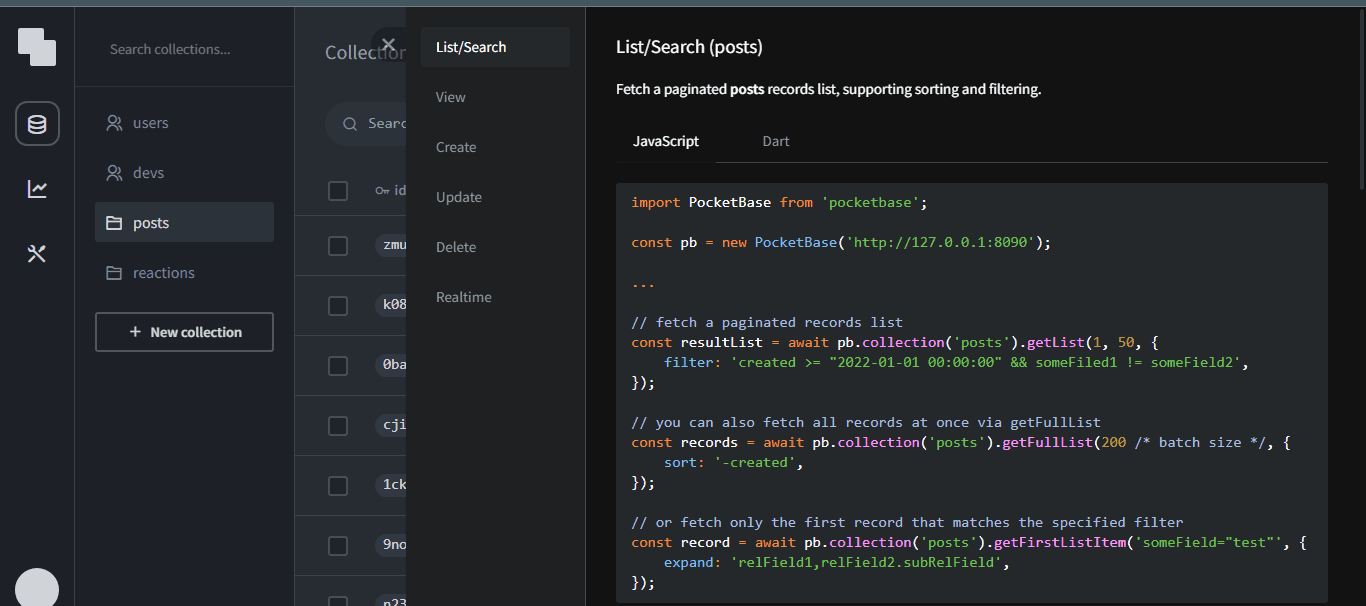
using the pocketbase JS SDK we can query the posts collection to populate our timeline
1import PocketBase from 'pocketbase';23const pb = new PocketBase('http://127.0.0.1:8090');45...67// fetch a paginated records list8const resultList = await pb.collection('posts').getList(1, 50, {9 filter: 'created >= "2022-01-01 00:00:00" && someFiled1 != someField2',10});1112// you can also fetch all records at once via getFullList13const records = await pb.collection('posts').getFullList(200 /* batch size */, {14 sort: '-created',15});1617// or fetch only the first record that matches the specified filter18const record = await pb.collection('posts').getFirstListItem('someField="test"', {19 expand: 'relField1,relField2.subRelField',20});
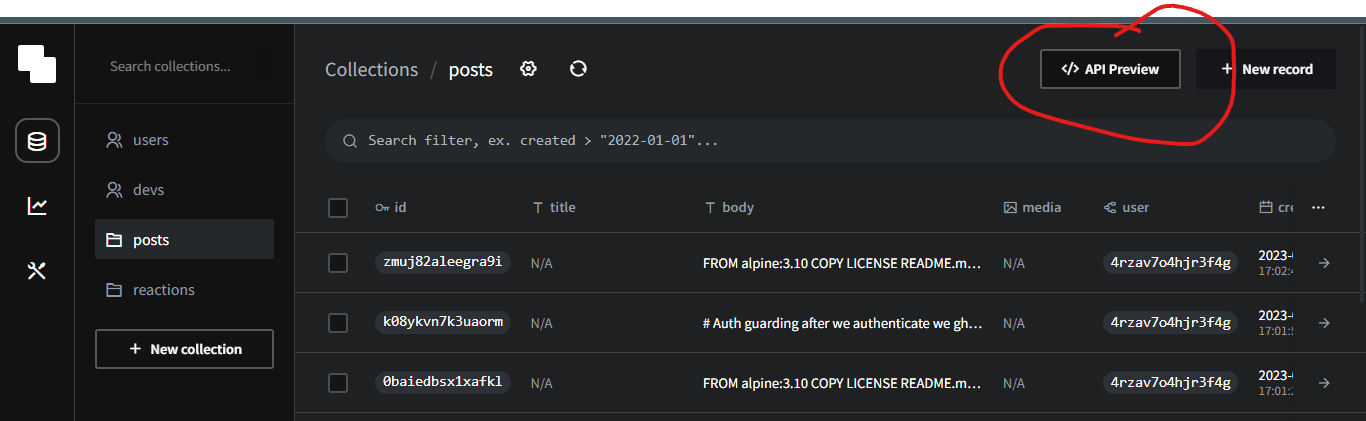
pocketbase admin panel has an API preview feature which is one of the best in the baas offerings
but the return data doesn't give us all the data at once
1 {2 "id": "RECORD_ID",3 "collectionId": "vbse1l0qet8z4hu",4 "collectionName": "posts",5 "created": "2022-01-01 01:00:00.123Z",6 "updated": "2022-01-01 23:59:59.456Z",7 "title": "test",8 "body": "test",9 "media": "filename.jpg",10 "user": "RELATION_RECORD_ID"11 }
we do want to have the like count and information on whether the logged in user like the current post on first glance before clicking on the post to see the tweet details
unfortunately server side aggregation isn't currently supported in pocketbase but is in the pipeline discussion
pocketbase does support expanding relations in an inner-join kind of way

but that still won't satisfy our needs so we'll have to go option 3 and open up pocketbase and use some of its exposed APIs
for this part we'll use pocketbase as a framework and make some slight modifications to return our desired shape of data
1git clone https://github.com/pocketbase/pocketbase.git
examples/base directory in it you'll have a main.go which you can use as the entry file to your new application12package main3import (4 "log"5 "os"6 "path/filepath"7 "strings"89 "github.com/pocketbase/pocketbase"10 "github.com/pocketbase/pocketbase/apis"11 "github.com/pocketbase/pocketbase/core"12 "github.com/pocketbase/pocketbase/plugins/jsvm"13 "github.com/pocketbase/pocketbase/plugins/migratecmd"14)1516func main() {17 app := pocketbase.New()1819 // ---------------------------------------------------------------20 // Optional plugin flags:21 // ---------------------------------------------------------------2223 var migrationsDir string24 app.RootCmd.PersistentFlags().StringVar(25 &migrationsDir,26 "migrationsDir",27 "",28 "the directory with the user defined migrations",29 )3031 var automigrate bool32 app.RootCmd.PersistentFlags().BoolVar(33 &automigrate,34 "automigrate",35 true,36 "enable/disable auto migrations",37 )3839 var publicDir string40 app.RootCmd.PersistentFlags().StringVar(41 &publicDir,42 "publicDir",43 defaultPublicDir(),44 "the directory to serve static files",45 )4647 var indexFallback bool48 app.RootCmd.PersistentFlags().BoolVar(49 &indexFallback,50 "indexFallback",51 true,52 "fallback the request to index.html on missing static path (eg. when pretty urls are used with SPA)",53 )5455 app.RootCmd.ParseFlags(os.Args[1:])5657 // ---------------------------------------------------------------58 // Plugins and hooks:59 // ---------------------------------------------------------------6061 // load js pb_migrations62 jsvm.MustRegisterMigrations(app, &jsvm.MigrationsOptions{63 Dir: migrationsDir,64 })6566 // migrate command (with js templates)67 migratecmd.MustRegister(app, app.RootCmd, &migratecmd.Options{68 TemplateLang: migratecmd.TemplateLangJS,69 Automigrate: automigrate,70 Dir: migrationsDir,71 })7273 app.OnBeforeServe().Add(func(e *core.ServeEvent) error {74 // serves static files from the provided public dir (if exists)75 e.Router.GET("/*", apis.StaticDirectoryHandler(os.DirFS(publicDir), indexFallback))76 return nil77 })7879 if err := app.Start(); err != nil {80 log.Fatal(err)81 }82}8384// the default pb_public dir location is relative to the executable85func defaultPublicDir() string {86 if strings.HasPrefix(os.Args[0], os.TempDir()) {87 // most likely ran with go run88 return "./pb_public"89 }90 return filepath.Join(os.Args[0], "../pb_public")91}
at this point you can run
1go run main.go serve
to output your custom pocketbase app the pocketbase CLI and dashboard will still work as expected but you can also extend some of the logic
for readability and maintainability I copied it out of there into a new directory and ran
1go mod init2go mod tidy
to setup the package enabling us to break up our logic into smaller packages living in their own files
our data models would look something like this
1devs2 {3 "id": "RECORD_ID",4 // "collectionId": "5sckr8a13top3zs",5 // "collectionName": "devs",6 // "created": "2022-01-01 01:00:00.123Z",7 // "updated": "2022-01-01 23:59:59.456Z",8 "username": "username123",9 "verified": false,10 "emailVisibility": true,11 "email": "test@example.com",12 "avatar": "https://example.com",13 "accessToken": "test",14 "displayname": "test"15 },
1posts2 {3 "id": "RECORD_ID",4 // "collectionId": "vbse1l0qet8z4hu",5 // "collectionName": "posts",6 // "created": "2022-01-01 01:00:00.123Z",7 // "updated": "2022-01-01 23:59:59.456Z",8 "title": "test",9 "body": "test",10 "media": "filename.jpg",11 "user": "RELATION_RECORD_ID"12 },
1reactions2 {3 "id": "RECORD_ID",4 // "collectionId": "4wcaptlpivjve1o",5 // "collectionName": "reactions",6 // "created": "2022-01-01 01:00:00.123Z",7 // "updated": "2022-01-01 23:59:59.456Z",8 "post": "RELATION_RECORD_ID",9 "user": "RELATION_RECORD_ID",10 "liked": "yes"11 },
So our first step would be to make sure only one reaction (like) per user is allowed the possible states will be
to avoid multiple likes by the same user to the same post we can add a unique index on the table using the migration by running
1go run *.go migrate create 'reaction_user_post_idx'
then replace the generated file contents inside pb_migrations with the below and it will be applied you restart pocketbase
1migrate((db) => {2 // add up queries...3 db.createUniqueIndex(4 'reactions',5 'reaction_user_post_idx',6 'user',7 'post'8 ).execute();9}, (db) => {10 // add down queries...11 db.dropIndex('reactions', 'reaction_user_post_idx').execute();12});
with that we can extend the router and add a custom route , I called mine custom_posts
1nside main.go
1 // ---------------------------------------------------------------2 // Plugins and hooks:3 // ---------------------------------------------------------------4 // Define the custom post route5 customPostRoute := CustomPostRoute(app)6 app.OnBeforeServe().Add(func(e *core.ServeEvent) error {7 e.Router.AddRoute(customPostRoute)89 return nil10 })11
inside posts.go
<details>
<summary>Click to expand posts.go</summary>
1package main23import (4 "fmt"5 "net/http"67 "github.com/labstack/echo/v5"8 "github.com/pocketbase/dbx"9 "github.com/pocketbase/pocketbase"10 "github.com/pocketbase/pocketbase/apis"11)1213// CustomPostRoute defines the HTTP route for getting custom posts14func CustomPostRoute(app *pocketbase.PocketBase) echo.Route {15 return echo.Route{16 Method: http.MethodGet,17 Path: "/custom_posts",18 Handler: func(c echo.Context) error {19 result := []*struct {20 CreatorId string `db:"creator_id" json:"creator_id"`21 CreatorName string `db:"creator_name" json:"creator_name"`22 CreatorImage string `db:"creator_image" json:"creator_image"`23 PostId string `db:"post_id" json:"post_id"`24 PostBody string `db:"post_body" json:"post_body"`25 PostMedia string `db:"post_media" json:"post_media"`26 CreatedAT string `db:"created_at" json:"created_at"`27 Likes int `db:"likes" json:"likes"`28 MyLike string `db:"mylike" json:"mylike"`29 ReactionId string `db:"reaction_id" json:"reaction_id"`30 }{}31 queryErr := app.Dao().DB().NewQuery(`32SELECT3334pp.user creator_id,35dv.username creator_name,36dv.avatar creator_image,37pp.id post_id,38pp.body post_body,39pp.media post_media,40pp.created created_at,4142(SELECT COUNT(*) FROM reactions WHERE liked = 'yes' AND post = pp.id) likes,43IFNULL((SELECT liked FROM reactions WHERE user = {:user} AND post = pp.id),'virgin')mylike,44IFNULL((SELECT id FROM reactions WHERE user = {:user} AND post = pp.id),"virgin") reaction_id45FROM posts pp46LEFT JOIN devs dv on dv.id = pp.user47WHERE (pp.created < {:created} OR (pp.created = {:created} AND pp.id < {:id}))48ORDER BY pp.created DESC, pp.id DESC49LIMIT 105051`).Bind(dbx.Params{"user": c.QueryParam("user"), "id": c.QueryParam("id"), "created": c.QueryParam("created")}).All(&result)52 if queryErr != nil {53 fmt.Print("\n")54 return apis.NewBadRequestError("Failed to fetch custom posts ", queryErr)55 }56 return c.JSON(200, result)57 },58 Middlewares: []echo.MiddlewareFunc{apis.ActivityLogger(app)},59 Name: "",60 }61}62
</details>
that SQL is probably not the best neither is the GO code since am not an expert on neither but it gives me the expected results when we run our pocketbase and hit the /custom_posts endpoint
 btw that's the thunder client VSCODE extension that am using as my REST client
|query parameter|description|
|----------------|----------|
| user | logged in user id | |id | record id
| created | SQLite date format |
The initial request requires user: the logged in user id and created: the latest date the rest can be sent as empty strings
1const currentdate = dayjs(new Date()).format("[YYYYescape] YYYY-MM-DDTHH:mm:ssZ[Z]")
the subsequent requests will need id: the last record id in the previous request
At this point we can run
1go build *.go -o pocketbase
and get our custom backend in one executable executable
you can also use a build script
to build a Linux and windows executable
now that we have an endpoint we can create a timeline route and useInfiniteQuery to get our data
1custom hook23import dayjs from "dayjs";4import { pb_url } from "../../utils/env";5import { PBUser } from "../../utils/types/types";6import { UseInfiniteQueryOptions, useInfiniteQuery } from "@tanstack/react-query";78interface PaginationDeps {9 pageParam: {10 created: string;11 id: string;12 };13}1415export const useInfiniteCustom = <T>(16 key: string,17 user: PBUser,18 options?:19 | Omit<UseInfiniteQueryOptions<T[], unknown, T[], T[], string[]>, "queryKey" | "queryFn">20 | undefined21) => {22 // custom-posts uses a where clause to paginate and needs the current23 //date formatted in sqlite date format as the starting point24 const currentdate = dayjs(new Date()).format("[YYYYescape] YYYY-MM-DDTHH:mm:ssZ[Z]");2526 const fetchPosts = async (deps?: Partial<PaginationDeps>) => {27 // console.log("page params dependaces === ", deps, deps.pageParam?.id)28 const url = `${pb_url}/custom_posts/?id=${deps?.pageParam?.id ?? ""}&user=${29 user?.id ?? ""}&created=${deps?.pageParam?.created ?? currentdate}`;30 let headersList = {31 Accept: "*/*"32 };33 try {34 const response = await fetch(url, {35 method: "GET",36 headers: headersList37 });38 const data = await response.json();39 console.log("response === ", data);40 if (data.code === 400) {41 throw new Error(data.message);42 }43 return data;44 } catch (e: any) {45 console.log("error fetching custom ", e);46 throw new Error(e.message);47 }48 };4950 return useInfiniteQuery<T[], unknown, T[], string[]>(51 [key],52 fetchPosts,53 options54 );555657};5859
then call it on our timeline component
1import React from 'react'2import { CustomPostType, PBUser } from '../../utils/types/types';3import { useInView } from 'react-intersection-observer'4import { useInfiniteCustom } from '../../shared/hooks/useInfiniteCustom';5import { QueryStateWrapper } from './../../shared/wrappers/QueryStateWrapper';6import { FaPlus } from 'react-icons/fa';7import { TheIcon } from '../../shared/wrappers/TheIcon';8import { PostsCard } from './../../components/timeline/PostCard';9import { PostForm } from './../../components/timeline/PostForm';10import { ReactModalWrapper } from './../../shared/wrappers/ReactModalWrapper';11interface TimelineProps {12 user: PBUser13}1415export const Timeline = ({user}: TimelineProps) => {16const { ref, inView } = useInView()17const [isOpen, setIsOpen] = React.useState(false);1819const customPostsQuery = useInfiniteCustom<CustomPostType>('custom-posts',user,{20 getNextPageParam: (lastPage, allPages) => {21 // console.log("last page ==== ",lastPage,allPages)22 if (lastPage && lastPage[lastPage.length - 1]) {23 return {24 created: lastPage[lastPage?.length - 1]?.created_at,25 id: lastPage[lastPage?.length - 1]?.post_id26 };27 }28 return;29 }30})3132 React.useEffect(() => {33 if (inView) {34 customPostsQuery.fetchNextPage()35 }36}, [inView])3738const data = customPostsQuery.data39// console.log("custom query === ",data)40return (41<QueryStateWrapper query={customPostsQuery}>42 <div className='w-full min-h-full flex flex-col gap-2 items-center justify-center'>43 <div className='w-[95%] h-full flex flex-col items-center justify-center gap-2 py-2'>44 {data?.pages.map((page) => {45 // console.log("page=== ",page)46 return page.map((item) => {47 return <PostsCard item={item} key={item.post_id} user={user} />48 })4950 })51 }52 </div>5354 <div className='w-fit h-fit p-2 bg-slate-500 text-white rounded-full fixed bottom-[10%] right-[5%]'>55 <TheIcon Icon={FaPlus} size={'40'} iconAction={() => setIsOpen(true)} />56 </div>5758 <ReactModalWrapper59 child={60 <PostForm user={user} setIsOpen={setIsOpen} />}61 closeModal={() => setIsOpen(false)}62 delay={2}63 isOpen={isOpen}64 styles={{65 overlay_top: '0%',66 overlay_right: '0%',67 overlay_left: '0%',68 overlay_bottom: '0%',69 content_bottom: '2%',70 content_right: '2%',71 content_left: '2%',72 content_top: '2%'7374 }}/>7576 <div>77 <button ref={ref}78 onClick={() => customPostsQuery.fetchNextPage()}79 disabled={!customPostsQuery.hasNextPage || customPostsQuery.isFetchingNextPage}>80 {customPostsQuery.isFetchingNextPage ? 'Loading more...': customPostsQuery.hasNextPage ? 'Load More'81 : !customPostsQuery.isLoading ? 'Nothing more to load' : null}</button>82 </div>8384 </div>85 </QueryStateWrapper>86);87}88
this method of having separate tables for posts and replies is getting hard to implement especially with mutations and aggregated fields , will switch to making replies in the posts table but with different depth levels
|query parameter|description|
|----------------|----------|
| user | logged in user id | |id | record id
| created | SQLite date format |
| parent | reply id for the reply its nested under|
| op | original post all the replies are on |
The initial request requires user: the logged in user id and created: the latest date the rest can be sent as empty strings
1const currentdate = dayjs(new Date()).format("[YYYYescape] YYYY-MM-DDTHH:mm:ssZ[Z]")