Back to blogs
Loading article…
Blog
Longer posts — published here first, then cross-posted to Dev.to with a canonical URL back to this site.
Back to blogs
Back to blogs
Posttypescript, node, mongodb, express
In this guide i’ll walk you through how to set up node s server frote point of view of a beginner...
Date published

Discriminated unions (also known as tagged unions) are a powerful TypeScript pattern that enables...

This error is a combination of CORS issues and incorrect cookie settings. To resolve you need to set...
A guide to creating Android home screen widgets using Expo modules, complete with state management,...
In this guide i’ll walk you through how to set up node s server frote point of view of a beginner who’s being tinkering around for the last 6 months and help you avoid the common issues i ran into in the process
I;ll assume you know the basic in javascript,typescript and graphql
But i’ll try and organise the github commits from the most basic
the typescript setup might be little cumbersome so i’d advise to clone the repo first before beginning this tutorial
Navigate to the initial commit and download or clone repo if you have git installed
You’ll also need to install and setup mongodb on your device or use mongo atlas , am not a fan of mongodb compass because of its lack of dark mode so i use the vscode extension MySQL database viewer:
https://marketplace.visualstudio.com/items?itemName=cweijan.vsc
Install and connect to sql and nosql databases
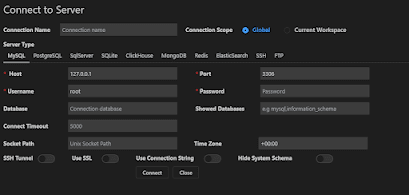
You might also vscode extensions for
Graphql and typescript
Run “npm install” in it’s root directory
Then npm run watch or yarn watch to watch for ts changes
Open another terminal to run npm start or yarn start
1import express from "express";2import cors from 'cors'3import { ApolloServer } from 'apollo-server-express';4import { gql } from 'apollo-server-express';56const PORT=4000;78const typeDefs =9gql`10 type Query {11 defaultPost:String12 }13`;14const resolvers = {15 Query: {16 defaultPost: () => "eat your vegetables",17 },18};1920const startServer=async()=>21{22const app = express();232425const allowedOrigins = [26'http://localhost:3000',27'http://localhost:3001',28'https://studio.apollographql.com'29];30const corsOptions = {31credentials: true,32 origin: function(origin, callback){33 if(!origin) return callback(null, true);34 if(allowedOrigins.indexOf(origin) === -1){35 var msg = 'The CORS policy for this site does not ' +36 'allow access from the specified Origin.';37 return callback(new Error(msg), false);38 }39 return callback(null, true);40 }41}42app.use(cors(corsOptions))43//rest routes44app.get("/", (req, res) => {45res.json({46 data: "API is working...",47 });48});4950const server = new ApolloServer({51 typeDefs,52 resolvers,53});54await server.start();5556server.applyMiddleware({ app });5758app.listen(PORT, () => {59 console.log(` Server is running at http://localhost:${PORT}`);60});61}62startServer().catch(e=>console.log("error strting server======== ",e))6364
our server is now ready navigate to
http://localhost:4000/graphqlto preview our server in apollo's playground and run our first query
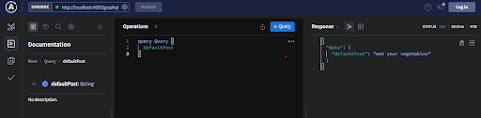
on the right hand side we have all the operatons which you can navigate to by clicking the the pluss button and adding field then run it and the response is displayed in the left hand side.
now we'll add mongodb into the project:
1var uri = "mongodb://localhost:27017/testmongo";23//@ts-ignore4mongoose.connect(uri, { useUnifiedTopology: true, useNewUrlParser: true })5.then(()=>console.log("connected to newmango db"))67
this will auto-create a newmango collection for us now we'll create a new directory models/TestModel.ts
then add this code to create a new mongo db model
1import mongoose from "mongoose";2const Schema = mongoose.Schema;34const TestSchema = new Schema({5 title: {6 type: String,7 required: true8 },9 desc: {10 type: String,11 required: true12 },1314},15//add this for auto createdAt and updatedat fields16{timestamps:true}17);1819export const TestModel= mongoose.model("Test", TestSchema);
then we'll also create resolver/TestResolver.ts and typeDefs/typeDef.ts
1import { TestModel } from "./../model/TestModel";2export const resolvers = {3 Query: {4 defaultPost: () => "eat your vegetables",5 getItems: async () => {6 const chats = await TestModel.find({});7 console.log("holt output ======", chats);8 return chats;9 },10 },11 Mutation: {12 //shape of params (parent,args, context, info)13 addItem: async (parent, { title, desc }, context, info) => {14 let item={}15 let error={}16 try{17 const newItem = await new TestModel({18 title,19 desc,20 });21 item=await newItem.save()22 console.log("item ==== ",item)2324 }catch(e){25 console.log("addTest error response =====", e.message);26 error=e27 }2829 return {30 item:item,31 error:{32 //@ts-ignore33 message:error.message34 }35 };36373839 },40 },41};42
1import { gql } from 'apollo-server-express';23export const typeDefs =4gql`type Item{5 title:String,6 desc:String7 }8 type Error{9 message:String10 }11 type ItemResponse{12 item:Item13 error:Error14 }15 type Query {16 defaultPost:String,17 getItems:[Item]18 },1920 type Mutation{21 addItem(title:String,desc:String):ItemResponse22 }232425`;26
add the respective code and import it in the index.ts
1import express from "express";2import cors from 'cors'3import { ApolloServer } from 'apollo-server-express';4import mongoose from 'mongoose';5import { resolvers } from './resolvers/TestResolver';6import { typeDefs } from './typeDefs/typedefs';78const PORT=4000;910const startServer=async()=>11{12const app = express();131415const allowedOrigins = [16'http://localhost:3000',17'http://localhost:3001',18'https://studio.apollographql.com'19];20const corsOptions = {21credentials: true,22 origin: function(origin, callback){23 if(!origin) return callback(null, true);24 if(allowedOrigins.indexOf(origin) === -1){25 var msg = 'The CORS policy for this site does not ' +26 'allow access from the specified Origin.';27 return callback(new Error(msg), false);28 }29 return callback(null, true);30 }31}32app.use(cors(corsOptions))33var uri = "mongodb://localhost:27017/testmongo";3435//@ts-ignore36mongoose.connect(uri, { useUnifiedTopology: true, useNewUrlParser: true })37.then(()=>console.log("connected to newmango db"))3839//rest routes40app.get("/", (req, res) => {41res.json({42 data: "API is working...",43 });44});454647const server = new ApolloServer({48 typeDefs,49 resolvers,50});51await server.start();5253server.applyMiddleware({ app });5455app.listen(PORT, () => {56 console.log(` Server is running at http://localhost:${PORT}`);57});58}59startServer().catch(e=>console.log("error strting server======== ",e))60
add the respective code and import it in the index.ts
The typedefs define what the data should look like and all it’s types
For example we have a custom type Item which is an object with the fields title of type Strung and desc of type String too
We also have to define the queries,mutations and subscriptions
These definitions are used to shape the data we’ll pass to and receive from our resolvers
Our resolver is comprised of a simple getItems query which returns an array of items from our mongo db
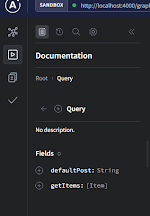
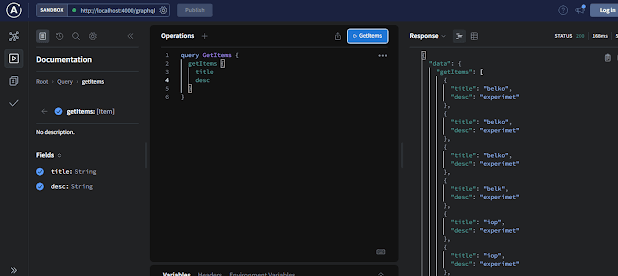
The addItem mutation takes title and desc and saves it to mongo then is returns an item response
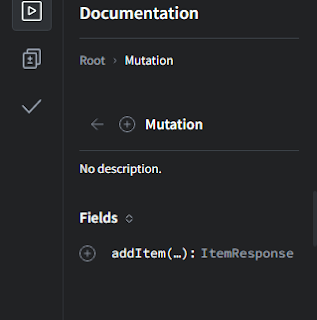
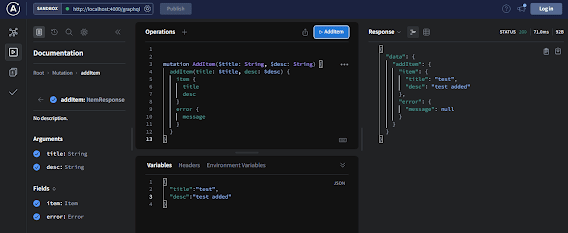
[the docs page]:(https://www.apollographql.com/docs/)
has more information for more complex mutations and queries
but if you've noticeed my code is still full of //@ts-ignore decorators because we are not using typescript it to it's fullest next time we'll set up type-graphql and typegoose for better type-checking which makes development much easier
we'll also handle delete and update in mongodb feel free to explore more till then