Back to blogs
Loading article…
Blog
Longer posts — published here first, then cross-posted to Dev.to with a canonical URL back to this site.
Back to blogs
Back to blogs
Postreact, firebase, tailwindcss, reactquery
This is probably not the first time you've heard of this combo nether is it the first that yov've...
Date published

Why You Might Still Pick Next.js Over TanStack Start From a TanStack Start...

A complete theme management system for React applications with SSR support! ✨ 🌟...

slides used in the presentation building the generic component In this example we'll use...
This is probably not the first time you've heard of this combo nether is it the first that yov've heard of it's utility. for the unitiated
```npx create-react-app my-app --template typescript
1 to spin up a typescript react template23- Firebase is a "serverless" solution for hosted software as a service backend utilities for most of your web needs ,in this tutorial we'll use firestore ,authentication, cloud functions and their emulator site foor local testing. they even have a hosting solution for static websites like the example we're about to put together4 56- React-query-firebase : is a react package that wraps around react-query to offer us custom hooks for firebase operations7 89- (optional) Tailwind is a utility-first CSS framework10 1112We'll be building a simple project manager which simulates a worKplace where employees will identify new prohect ideas and seek approval ,once approved the project will need funding once funded it will need to be marked done after being acconplished1314#Ui setup1516for simplicity just clone the starter files for the Ui section
git clone https://github.com/tigawanna/starter-files-for-project-manager.git
1and run npm i to get dependancies23or45run the script below for startup67`npx create-react-app my-app --template tailwindcss-typescript`89then install our other required depnendancies10
npm i firebase npm install react-router-dom@6 npm i react-query npm i @react-query-firebase/firestore npm i @react-query-firebase/auth npm i @react-query-firebase/functions
123we'll first set-up the routing4
import React from 'react'; import './App.css'; import { Routes, Route } from "react-router-dom"; import { BrowserRouter } from 'react-router-dom'; import { Toolbar } from './components/Toolbar/Toolbar'; import { Project } from './components/Projects/Project'; import { Home } from './components/Home/Home';
function App() { return (
<div className="h-screen w-screen overflow-x-hidden ">
<BrowserRouter>
<div className="fixed top-[0px] right-1 w-full z-30">
<Toolbar />
</div>
<div className="w-full h-full mt-16 ">
<Routes>
<Route path="/" element={<Home />} /> <Route path="/project" element={<Project />} />
</Routes>
</div>
</BrowserRouter>
</div>
); }
export default App;
1Toolbar.tsx:
import React from 'react' import { GrHome } from "react-icons/gr"; import { IconContext } from "react-icons/lib"; import { Link } from "react-router-dom"; import { FaUserCircle } from 'react-icons/fa'; interface ToolbarProps {
}
export const Toolbar: React.FC<ToolbarProps> = () => { return (
<div className='w-full bg-slate-500 h-16'>
<IconContext.Provider value={{ size: "25px", className: "table-edit-icons" }} >
<div className='flex flex-grow flex-3'>
<div className='m-1 w-full p-3 bg-slate-800'>
<Link to="/"><GrHome /></Link>
</div>
<div className='m-1 w-full p-3 bg-slate-600'>
<Link to="/project">Project</Link>
</div>
<div className='m-1 w-fit p-3 bg-slate-700'><FaUserCircle/></div>
</div>
</IconContext.Provider>
</div>
); }
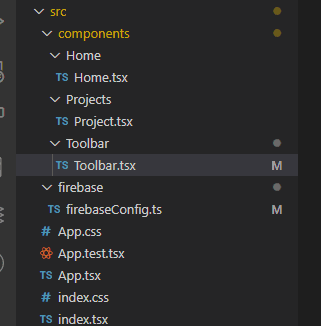
12our folder structure should look something like this after adding a component and firebase directory inside the src folder. then creating a directory for Home.tsx and Project.tsx inside the components and firebaseConfig.ts345To setup firebase you/ll first need to visit [the firebase console ](https://console.firebase.google.com/?pli=1) , after the seyup process you'll recieve your own firebaseConfig json object to use below67firebaseComfig.tsx:
import { initializeApp } from "firebase/app"; import { getFirestore } from "firebase/firestore" import { GoogleAuthProvider,getAuth} from "firebase/auth";
const firebaseConfig = { apiKey: "your Api key", authDomain: "your Auth domain", databaseURL: "your databaseUrl", projectId: "your project name", storageBucket: "your storage bucket", messagingSenderId: "your sender id", appId: "your app id" };
const app = initializeApp(firebaseConfig);
export const db = getFirestore(); export const provider = new GoogleAuthProvider(); export const auth = getAuth(app)
```
starter files for the Ui section
`git clone https://github.com/tigawanna/starter-files-for-project-manager.git
`
a firebase project with firestore,authentication and functions will also need to be created
set up process
and run npm i to get dependancies