Back to blogs
Loading article…
Blog
Longer posts — published here first, then cross-posted to Dev.to with a canonical URL back to this site.
Back to blogs
Back to blogs
Postmarkdown, webdev, javascript, github
I have a page in my portfolio that's supposed to load a repository and display it's details , but...
Date published

Why You Might Still Pick Next.js Over TanStack Start From a TanStack Start...

A complete theme management system for React applications with SSR support! ✨ 🌟...

Modify your nextauth client and add a callbacks section that will get the access token from the...
I have a page in my portfolio that's supposed to load a repository and display it's details , but besides the name , languages and topics we don't have other details to describe it in-depth . Most projects already have readmes which render really nicely on github with GFM , I want that on my page.
We'll start by fetching and parsing the readme into html .
1npm i showdown highlight.js2npm i -D @types/showdown
1markdown parser23import showdown from 'showdown';4import hljs from 'highlight.js';56789export function convertMarkdownToHtml(markdown: string): string {1011 showdown.extension("highlight", function () {12 function htmlunencode(text: string): string {13 return text14 .replace(/&/g, "&")15 .replace(/</g, "<")16 .replace(/>/g, ">");17 }18 return [19 {20 type: "output",21 filter: function (text: string, converter: any, options: any): string {22 var left = "<pre><code\\b[^>]*>",23 right = "</code></pre>",24 flags = "g";25 var replacement = function (26 wholeMatch: string,27 match: string,28 left: string,29 right: string,30 ): string {31 match = htmlunencode(match);32 var lang = (left.match(/class=\"([^ \"]+)/) || [])[1];33 left = left.slice(0, 18) + "hljs " + left.slice(18);34 if (lang && hljs.getLanguage(lang)) {35 return (36 left + hljs.highlight(match, { language: lang }).value + right37 );38 } else {39 return left + hljs.highlightAuto(match).value + right;40 }41 };42 return showdown.helper.replaceRecursiveRegExp(43 text,44 replacement,45 left,46 right,47 flags,48 );49 },50 },51 ];52 });535455 let converter = new showdown.Converter({56 ghCompatibleHeaderId: true,57 simpleLineBreaks: true,58 ghMentions: true,59 extensions: ['highlight'],60 tables: true61 });6263 let preContent: string = `64 <html>65 <head>66 <title></title>67 <meta name="viewport" content="width=device-width, initial-scale=1">68 <meta charset="UTF-8">6970 <link rel="stylesheet"node_modules/highlight.js/styles/atom-one-dark.css">71 <script defer src="https://plausible.io/js/script.js"></script>72 </head>73 <body>74 <div id=''>75 `;7677 let postContent: string = `78 </div>79 </body>80 </html>`;8182 let html: string = preContent + converter.makeHtml(markdown) + postContent;8384 return html;85}86
Then we'll add some styles
1.markdown {2 @apply text-base-content leading-normal break-words p-2;3 overflow-x: scroll;4 line-height: 2;5}67.markdown > * + * {8 @apply mt-0 mb-4;9}1011.markdown li + li {12 @apply mt-1;13}1415.markdown li > p + p {16 @apply mt-6 mb-2;17}1819.markdown strong {20 @apply font-semibold;21}2223.markdown a {24 @apply text-blue-600 font-semibold;25}26.markdown a:hover {27 @apply text-blue-400 font-semibold;28}2930.markdown strong a {31 @apply font-bold;32}3334.markdown h1 {35 @apply leading-tight border-b text-4xl font-semibold mb-4 mt-6 pb-2;36}3738.markdown h2 {39 @apply leading-tight border-b text-2xl font-semibold mb-4 mt-6 pb-2;40}4142.markdown h3 {43 @apply leading-snug text-lg font-semibold mb-4 mt-6;44}4546.markdown h4 {47 @apply leading-none text-base font-semibold mb-4 mt-6;48}4950.markdown h5 {51 @apply leading-tight text-sm font-semibold mb-4 mt-6;52}5354.markdown h6 {55 @apply leading-tight text-sm font-semibold text-base-content mb-4 mt-6;56}5758.markdown blockquote {59 @apply text-base border-l-4 border-base-200 px-3 text-base-content/70;60}6162.markdown code {63 @apply font-mono text-sm inline bg-base-100/60 rounded-2xl px-1 py-2 my-5;64}6566.markdown pre {67 @apply bg-base-200/60 rounded-2xl p-2;68}6970.markdown pre code {71 @apply block bg-transparent p-0 overflow-visible rounded-2xl my-5;72}7374.markdown ul {75 @apply text-base pl-8 list-disc;76}7778.markdown ol {79 @apply text-base pl-4 list-decimal;80}8182.markdown kbd {83 @apply text-xs inline-block rounded border px-1 py-5 align-middle font-normal font-mono shadow;84}8586.markdown table {87 @apply text-base border-base-300;88}8990.markdown th {91 @apply border font-bold text-lg py-1 px-3;92}9394.markdown td {95 @apply border py-1 px-3;96}9798/* Override pygments style background color. */99.markdown .highlight pre {100 @apply bg-base-200/40 !important;101}102103.markdown pre {104 border-radius: "10%";105 font-size: 85%;106 line-height: 1.8;107 overflow: auto;108}109110code.hljs {111 padding: 3px 5px;112}113/*114115Atom One Dark by Daniel Gamage116Original One Dark Syntax theme from https://github.com/atom/one-dark-syntax117118base: #282c34119mono-1: #abb2bf120mono-2: #818896121mono-3: #5c6370122hue-1: #56b6c2123hue-2: #61aeee124hue-3: #c678dd125hue-4: #98c379126hue-5: #e06c75127hue-5-2: #be5046128hue-6: #d19a66129hue-6-2: #e6c07b130131*/132.hljs {133 color: #abb2bf;134 background: #282c34;135}136.hljs-comment,137.hljs-quote {138 color: #5c6370;139 font-style: italic;140}141.hljs-doctag,142.hljs-keyword,143.hljs-formula {144 color: #c678dd;145}146.hljs-section,147.hljs-name,148.hljs-selector-tag,149.hljs-deletion,150.hljs-subst {151 color: #e06c75;152}153.hljs-literal {154 color: #56b6c2;155}156.hljs-string,157.hljs-regexp,158.hljs-addition,159.hljs-attribute,160.hljs-meta .hljs-string {161 color: #98c379;162}163.hljs-attr,164.hljs-variable,165.hljs-template-variable,166.hljs-type,167.hljs-selector-class,168.hljs-selector-attr,169.hljs-selector-pseudo,170.hljs-number {171 color: #d19a66;172}173.hljs-symbol,174.hljs-bullet,175.hljs-link,176.hljs-meta,177.hljs-selector-id,178.hljs-title {179 color: #61aeee;180}181.hljs-built_in,182.hljs-title.class_,183.hljs-class .hljs-title {184 color: #e6c07b;185}186.hljs-emphasis {187 font-style: italic;188}189.hljs-strong {190 font-weight: bold;191}192.hljs-link {193 text-decoration: underline;194}
import styles into your project (most projects, Nextjs or Vite require all stylesheets to be added at the root layout or main.tsx component )
1layout.tsx23import "./globals.css";4import "../state/md/markdown.css";
Fetch the readme from github and pass the string into the parser
1import { convertMarkdownToHtml } from "@/state/md/parse";23interface GetRepoREADME {4 repo: string;5 owner: string;6}7export async function getGithubREADME({ repo, owner }: GetRepoREADME) {8 try {9 const response = await fetch(10 `https://raw.githubusercontent.com/${owner}/${repo}/main/README.md`11 );12 if (!response.ok) {13 throw new Error(response.statusText);14 }15 const text = await response.text();16 if (!text) {17 throw new Error("no parsable readme");18 }19 const output_html = convertMarkdownToHtml(text);20 return output_html;21 } catch (error) {22 console.log(" === error === ", error);23 return;24 }25}
We can the use this in our project , am using Nextjs but you can use whatever you want.
1import { getGithubREADME } from "../helpers/getOneRepomarkdown";23interface OneGithubRepoREADMEProps {4 repo: string;5 owner: string;6}78export async function OneGithubRepoREADME({owner,repo}:OneGithubRepoREADMEProps){9 const data = await getGithubREADME({owner,repo})1011 if (!data ) {12 return null;13 }1415return (16 <div id="readme" className='w-[95%] md:w-[85%] h-full17 bg-base-200/30 p-5 rounded-xl '>18 <h2 className="text-2xl font-bold text-start w-full capitalize">{repo} readme</h2>19 <div className="markdown" dangerouslySetInnerHTML={{ __html: data}} />20 </div>21);22}23
This code works on browser or Nodejs and even server components
You can customize the styles by picking another theme from node_modules/highlight.js/styles and replacing the existing one in the provided CSS (all that start with hljs-)
Shout out to KrauseFx for the code
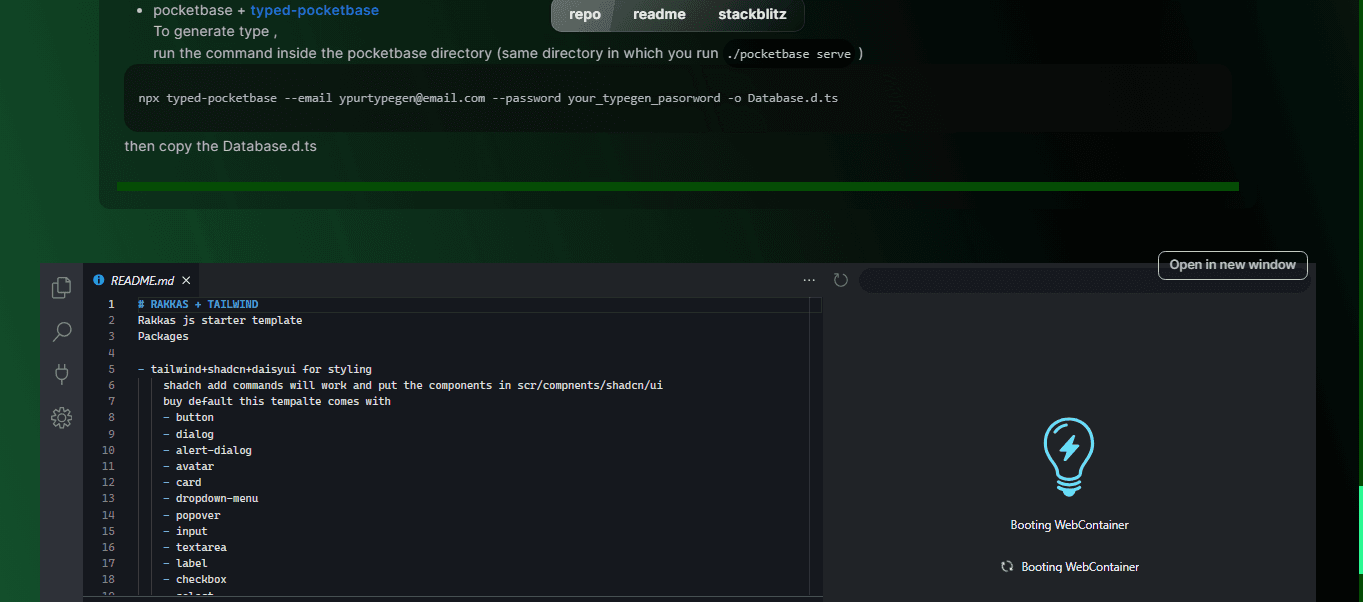
One extra thing we can add is a stackblitz component to let the visitor play around with our code directly in the browser using the @stackblitz/sdk package
12"use client"3import sdk from "@stackblitz/sdk";4import { useEffect } from "react";56interface stackblitzEmbedProps {7 repo: string;8 owner: string;910}1112export function StackblitzEmbed({owner,repo}: stackblitzEmbedProps) {13 const selectedRepo = {14 github: `${owner}/${repo}`,15 openFile: "README.md",16 };1718 useEffect(() => {19 sdk.embedGithubProject("embed", selectedRepo.github, {20 height: 1000,21 clickToLoad: true,22 // openFile: selectedRepo.openFile,23 });24 }, [selectedRepo.github]);2526 /**27 * Open the project in a new window on StackBlitz28 */29 function openProject() {30 sdk.openGithubProject(selectedRepo.github, {31 // openFile: selectedRepo.openFile,32 });33 }3435 return (36 <div id="stackblitz" className="w-full h-full relative">37 <button className="btn btn-sm btn-outline hover:bg-secondary absolute top-[1%] right-[2%]"38 onClick={openProject} >39 Open in new window40 </button>41 <div id="embed" className="mt-5 p-5 w-[95%] h-full flex items-center justify-center">B</div>4243 </div>44 )45}